MVPs Verified

Exchange EDB Recovery Tool

We developed an advanced software to recover deleted data from EDB file. Simply download EDB recovery software and launch it on any Windows OS version syste.

  • Recover EDB File Data and Save in PST, MSG, EML, MBOX, HTML, PDF
  • Supports Recovery from Large, Inaccessible, Dismonted EDB File
  • Maintains Folder Order, Data Integrity, and Email Formatting
  • Capable to Recover Emails, Contacts, Calendars, Attachments, Etc.
  • Allows to Save Scanned EDB File and Load Instantly in Next Load
  • Download EDB Recovery Tool Free Demo Version and Check Installation

exchange recovery

Free Download

Verified EDB Recovery Software

Recover Data from EDB File and Save in Accessible File Formats

  • Effortlessly Recover Lost or Damaged Mailbox Items from Exchange
  • Preview EDB File Data and Attributes Before EDB Recovery
  • Decrypt SMIME/OpenPGP Encrypted Emails within EDB Mailboxes
  • Resume Scanning by Loading Previously Saved Data from Scanned EDB
  • Recover Exchange Mailboxes Even from Offline or Non-Operational Servers
  • Extract Mailboxes from dismounted or Inactive EDB Files in Exchange
  • Preserve Original Folder Structure When Restoring MS Exchange Mailboxes
  • Leverage Options Like Categories, Date Filters, and Naming Conventions
  • Directly Export Recovered Mailboxes to: Live Exchange Server or Office 365 Account
  • EDB Recovery Software is Compatible with Windows 11 and Below Versions

Free Demo Available: Test Software Installation and Features using Free Demo Version

Use Cases of This Software

EDB Recovery Tool is Usefull for Issues

Corruption in Exchange Database (EDB)

Scenario: Due to various reasons, such as hardware failure, disk errors, or software bugs, the Exchange Database (EDB) file has become corrupt.

Recovery Need: You need to recover the database from corruption to restore email functionality, including all associated mailboxes, calendars, tasks, and other data using the Exchange recovery tool.

Accidental Deletion of Mailboxes or Emails

Scenario: A user mistakenly deleted an important email thread, or a manager accidentally deleted an entire mailbox.

Recovery Need: Recovering deleted items from an EDB file or mailbox or restoring an entire deleted mailbox is essential to accessing data again.

Ransomware or Malware Attacks

Scenario: A ransomware attack or malware infection corrupts the Exchange server's database, causing data to be encrypted, deleted, or altered.

Recovery Need: Recover the data to restore access to emails and mailboxes before and after the ransomware attack.

Recovery Tool Necessity

Why Exchange Recovery Tool is Needed?

The Exchange servers store critical data, including emails, contacts, calendars, tasks, etc. When issues like database corruption, accidental deletions, system crashes, or disasters occur, it can lead to the unavailability of critical data. Without a reliable recovery solution, businesses may experience prolonged downtime, loss of data, and operational inefficiencies.

The Exchange EDB Recovery Tool helps in such situations by offering the following benefits:

  • Repairs corrupted EDB files caused by hardware failure or software bugs.
  • Recovers deleted emails, mailboxes, and contacts even after deletion.
  • Ensures smooth migrations by preventing data loss or corruption during transitions.
  • Exports recovered data to PST, Office 365, or Live Exchange.
  • Restores data after system failures, crashes, or ransomware attacks.
  • Reduces downtime, allowing employees to access important data quickly.

Reasons for Tool Trust

Reasons to Trust This Exchange EDB Recovery Tool

Recover Exchange Database

The Exchange Recovery Tool allows to restoration of deleted Exchange mailboxes from offline or dismounted EDB files effortlessly. It simplifies the process of recovering a corrupt Exchange database. With this powerful tool, users can easily browse through eliminated data and recover deleted files from the Exchange Server with ease.

Map Multiple Files to Office 365

The modern Exchange EDB Recovery Tool enables users to convert multiple mailboxes to Office 365 simultaneously. The built-in mapping option allows for seamless mailbox export to their corresponding Office 365 user accounts. Users can map multiple mailboxes at once, streamlining large-scale migrations and saving time.

Recover EDB as PST

Along with recovering Exchange mailboxes, the tool offers the option to export the recovered files as Outlook PST files. Users can create UNICODE-format PST files to save various mailbox components, including emails, contacts, calendars, tasks, notes, and journals.

Preview Attributes & Meta Data

The EDB recovery tool gives an immediate preview of all EDB items including emails, contacts, calendars, tasks, journals, etc along with the corresponding metadata. Therefore, the utility preserves emails with their original formatting and includes all associated attachments.

Multiple File Formats Supported

The Exchange Recovery Tool offers versatile export options to save recovered Exchange EDB emails in formats such as MSG, EML, PDF, MBOX, and HTML. Users can select their preferred format for emails to use the recovered data in applications like Windows Live Mail, Outlook Express, and more.

Auto Generate CSV File Option

The users don't need to generate CSV files on their own for targeted mailboxes. With the Auto-generate CSV option of the tool, the users can generate the CSV file with the desired name on any location and then, open the file to fill up only the destination mailbox column. Please note that several entries in source and destination mailbox names should be equal.

Date and Time-Based Filter

Best Exchange Recovery tool provides date and time-based filter options for emails, specifically. While exporting the Exchange Files to desired file formats or importing them to the live Exchange Environment, the filtration option can be applied to move the selected Emails. The EDB file recovery tool thus provides an easy-to-work interface to recover deleted emails from Exchange selectively.

Bates Number and Stamping to PDFs

The user can use the facility to set Page Numbers to PDF depending on the required positions of the numbers. The date stamps to PDFs can also be applied based on the preferable positions. This feature is primarily used in organizations to add numbers to their large PDF files.

Save Exchange Database Scan

Exchange Recovery Tool also offers a time-saving feature to save scanned EDB files. By saving scans, you can avoid the need to re-scan files, enabling faster future conversions using the saved scan data.

Scanning Modes: Quick & Advanced

Exchange Recovery Tool offers two scanning modes: Quick Scan for minimally corrupted EDB files and Advanced Scan for deeply corrupted files. However, Advance Scan needs some time to upload corrupted data, while the Quick Scan option is faster for recovering healthy or minimally corrupted files. Despite that, this utility batch decrypts SMIME/OpenPGP emails from Exchange using the right credentials.

No Issue with 2 GB PST Size

Exchange EDB Recovery Tool is designed to repair corrupt Exchange databases and generate PST files in UNICODE format. This allows users to create and import Outlook PST files larger than 2 GB without encountering any issues.

Switch Screen Mode

It not only supports restoring EDB files in Exchange Server but also offers users the flexibility of a customizable screen view. While the default view is horizontal, users can easily switch to a different screen layout according to their preferences.

Tool Launch Criteria

Exchange EDB Recovery Tool - Specifications!

edb recovery
Version: 10.2
Size: 58.5 MB
MD5: d9299c731f8e5e12a7ca42417211f3fb
Software Download: Download Now Download Now

Trial Limitations:
The demo version of the utility provides a preview of mailbox data and allows recovery of only 25 items per folder from EDB mailbox.
Hard Disk Space: 100 MB of free hard disk space required
RAM: 4 GB is recommended
Processor: Intel® Core™ 2 Duo CPU E4600 @ 2.40GHz 2.39GHz

Platforms:
  • Microsoft Windows – Windows 11 (64 bit), Windows 10, 8, 7 (32 bit or 64 bit) & Windows Server 2022, 2019, 2016, 2012 R2, 2008
  • Microsoft Outlook – 2003, 2007, 2010, 2013, 2016 (32-Bit & 64-Bit)
  • Exchange Server – 2003, 2007, 2010, 2013, 2016, 2019 (32 & 64-bit)
  • Office 365 – Enterprise E1 / E3 / E5 / Business Premium / Essentials & Exchange Online Plan 1 / Plan 2 & Office 365 A1 / A3 / A5 / F1

Pre Requisites:
edb recovery
  • Microsoft .NET framework 4.5 or above should be installed.
  • Exporting in PST Format:
    • MS Outlook installation is required, if using 'Use Outlook' option in Export Option Window.
  • Exporting in Office 365:
    • Admin account of Office 365 must be Impersonated, if migrating to Admin account.
  • Exporting in Live Exchange Server:
    • Exchange 2007 & above: Admin account must be impersonated.
    • Exchange 2003: MS Outlook should be configured with Exchange Server.
    • FULL access permission to mailboxes should be granted.
    • Migration PC should be in same domain where exchange server is installed.
  • For Remove Email Encryption option:
    • Certificates & respective passwords to decrypt SMIME encrypted Emails.
    • Private Keys & respective passwords to decrypt OPENPGP encrypted Emails.

Product Guide:
Software Guide   Installation   Uninstallation   EULA  

FAQs:
edb recovery

Purchase Order

edb recovery

Visual Guide Tutorial

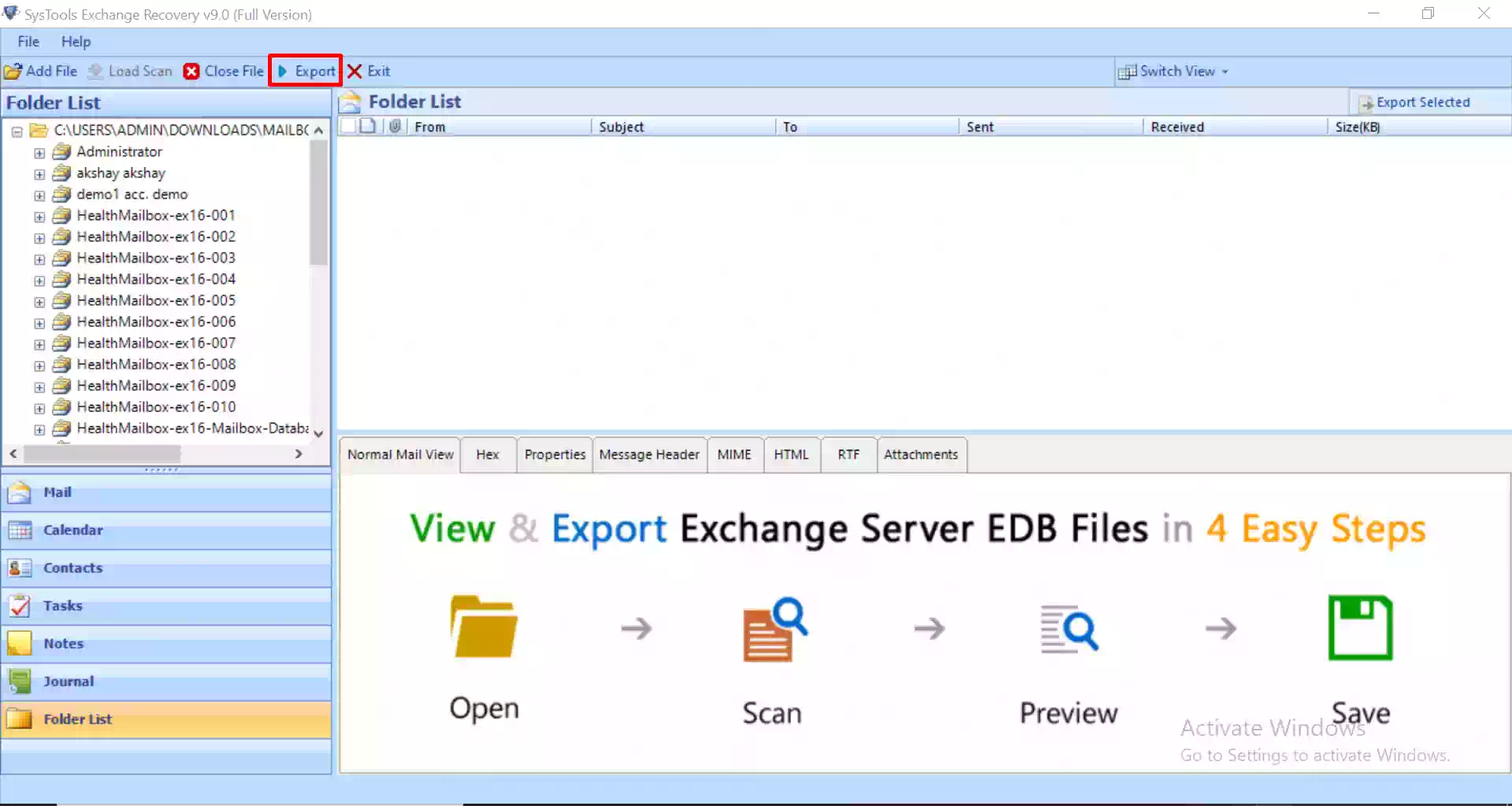
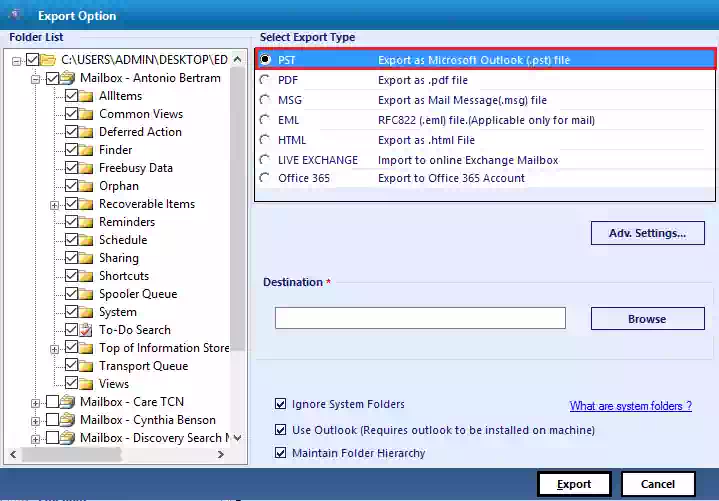
Exchange EDB Recovery Tool – Screenshots!

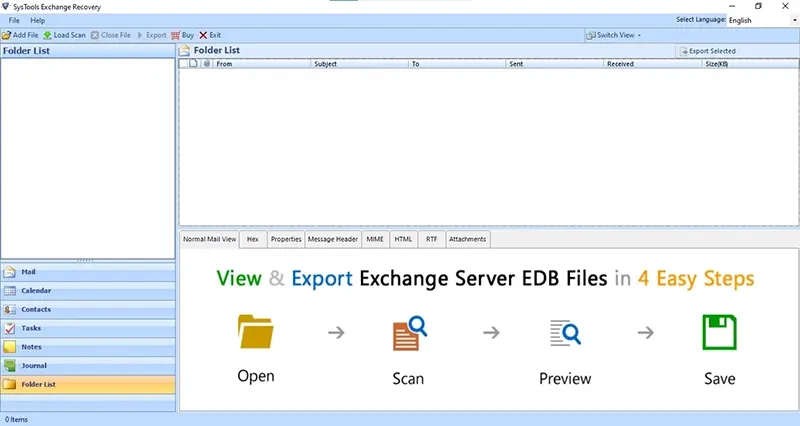
run the solution
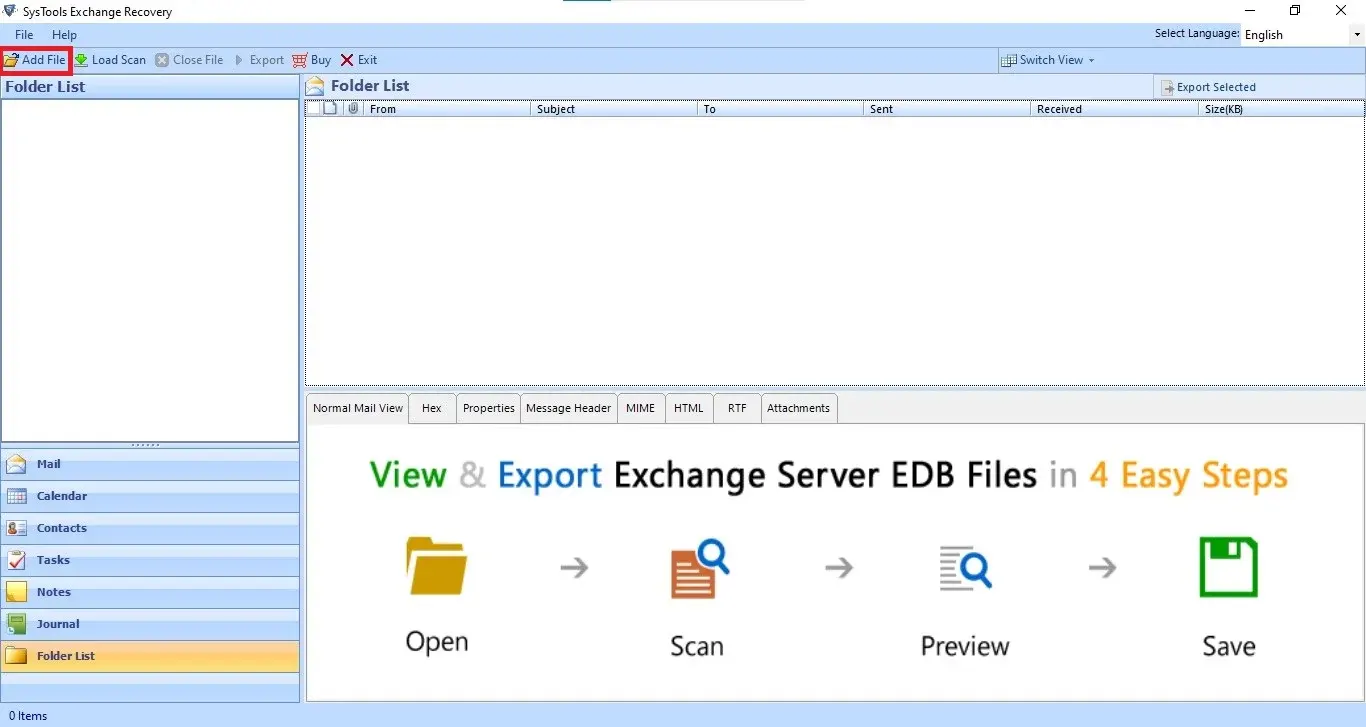
add file
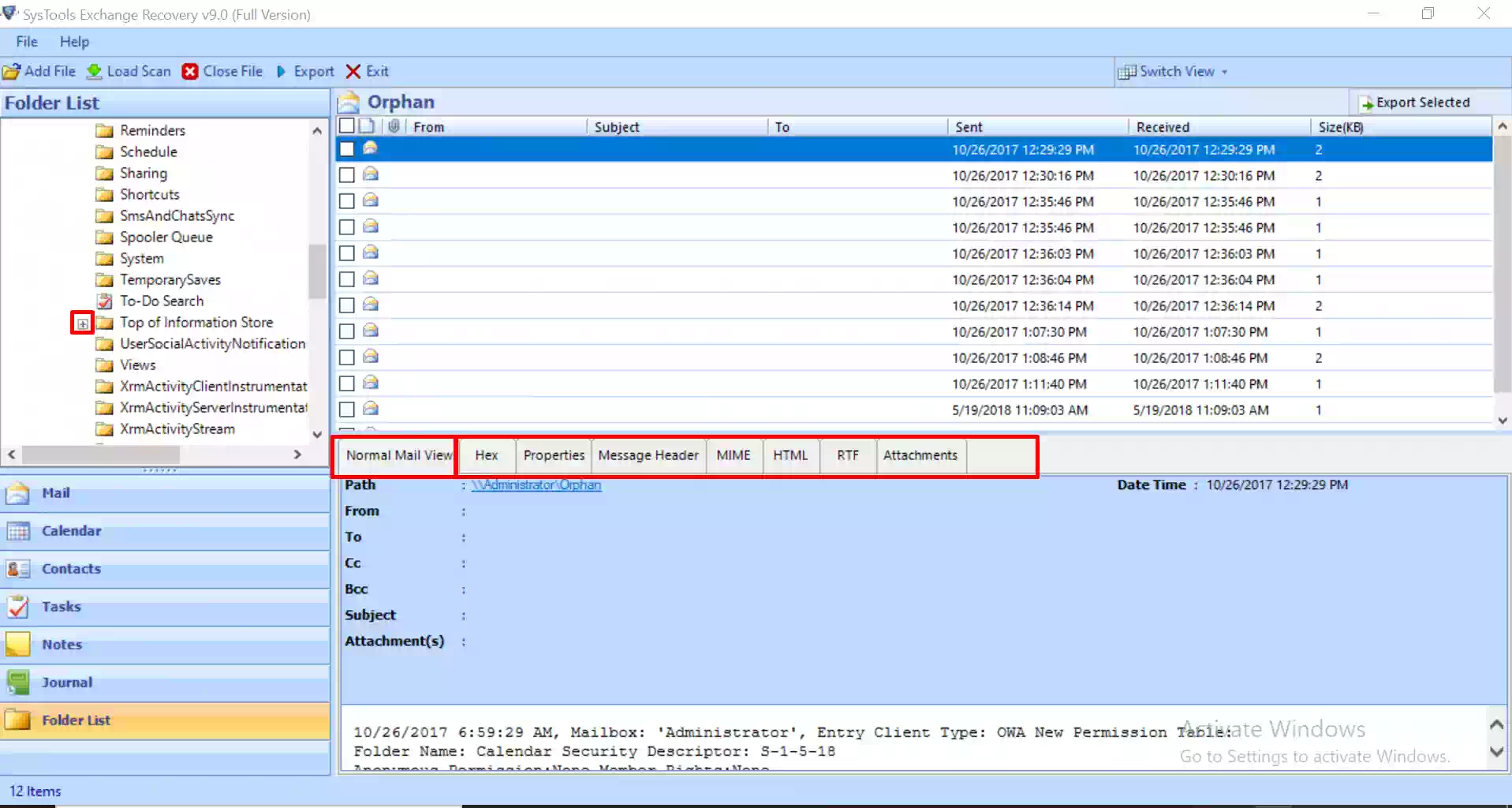
preview
click export
edb recovery

Free vs Paid

EDB Recovery Software - Feature Comparison

Features

Free Version

Full Version

Add EDB & STM File in Software Panel

Two Scanning Modes (Quick & Advanced)

Preview EDB Emails with Attachments

Restore Deleted Exchange EDB File Items

Decrypt Exchange Email Messages

Recover Exchange EDB File

Recover Exchange Database Mailbox

Specify Size to Create Output in PST File

Windows 11, 10, 8, 7 (32 bit or 64 bit) & Windows Server 2019, 2016, 2012 R2, 2008

Save Recovered Data in PST, EML, MBOX, MSG, PDF & HTML

25 Items / Folder

Migrate Data Directly to Office 365 & Live Exchange Server

25 Items / Folder

Cost

Free

$299

Find Your Answer

Exchange Recovery Tool - Top Questions!

Yes, the Exchange Recovery Tool can help in recovering damaged files after a dirty shutdown state. But, it is always recommended to avoid such situations. One may follow these measures to avoid such situations:

  • Initially, the Exchange Server should be completely disconnected from your machine.
  • Copy the Exchange EDB file safely onto your hard drive.
  • Now perform EDB database recovery.

Yes, users must have required Administrator rights to export the scanned files to the Exchange Server. This is essential for your security.

The major corruptive errors such as Exchange 501 and Exchange Database Crash are repaired by the Advanced scanning operation provided by the Microsoft Exchange Server Recovery tool. This function to repair EDB files in the tool helps in debugging server errors and can be used as a reliable measure to restore EDB files in Exchange.

Yes, the software can repair corrupt Exchange databases. The Exchange Recovery tool is designed to extract mailboxes from EDB that are corrupted and later this data can be exported to Live Exchange Server.

No, this software recovers EDB mailboxes in various file formats. However, one may need to have the live Exchange Server environment if he/she wants to migrate mailboxes from scanned EDB files to the Exchange Server.

No, this Advanced Exchange Recovery Tool does not have any limitation on the size of the Exchange EDB file. You can recover and export any size of EDB file containing multiple mailboxes. This EDB file repair tool is successfully tested with data files up to 1TB.

It can handle any type of corruption: Logical Corruption, Header Corruption, Transaction Log Corruption, Page-level Corruption, and Public Folder Corruption smoothly.

With this user can address several common Exchange Server error codes such as Error 1018, Error -1216, Error -1022, Error 0x80004005, Error 0x8004010F, and Error 0x80040115.

Exchange Recovery

We’re Here to Help!

Every step of the way, we're here to assist you. As you navigate the recovery process, keep in mind that our expert support is designed to help you fully restore your Exchange environment.

User Reviews

Real Stories from Our Satisfied Clients!

s